

Updated on October 12, 2026
Spreadsheets have their place in HR. They’re accessible, familiar, and often a practical way to get a new process off the ground. When you’re working with limited resources, creating a spreadsheet to track employee leaves can feel like the simplest way to get organized.
And sometimes, it works just fine.
The challenge comes when that spreadsheet becomes the foundation for managing an increasingly complex process. What starts as a straightforward tracker can turn into a web of manual updates, follow-up emails, disconnected systems, and ongoing maintenance that takes more time than you have to give.
Leave management is a good example. Tracking an employee’s leave involves much more than recording a start date and an anticipated return date. Depending on the situation, you may need to monitor FMLA usage, track documentation and deadlines, coordinate with payroll, communicate with employees and managers, and keep information organized throughout the process.
When all of that depends on manually maintaining spreadsheets, keeping everything accurate and up to date can become a job in itself.
For lean HR teams, the question isn’t whether spreadsheets are good or bad. It’s whether they’re still the best way to manage the work.
If your leave tracking process is taking too much time, becoming harder to maintain, or making it difficult to keep up as your organization grows, here are four steps to help you move toward a more manageable approach.
Step 1: Make Time to Evaluate Your Current Process
When your to-do list is already full, finding time to evaluate your processes can feel counterproductive. But if you’re spending hours each week updating spreadsheets and tracking down information, taking a step back may be exactly what you need.
Start by looking at how you’re currently managing leaves of absence. Where does information live? Which tasks require manual updates? How often are you switching between systems to get a complete picture of an employee’s leave?
Consider the time spent on activities like:
- Updating leave dates, balances, and employee information.
- Tracking FMLA usage and other applicable leave requirements.
- Following up on missing documentation or upcoming deadlines.
- Coordinating with payroll, managers, and other stakeholders.
- Answering employee questions about the process and next steps.
- Checking multiple records to make sure information is accurate and consistent.
You don’t need to overhaul your entire HR tech stack to make progress. Start with the tasks that take the most time, create the most friction, or are becoming increasingly difficult to manage consistently.
It may turn out that a few process improvements are all you need. Or you may discover that your spreadsheet has become a workaround for a process that would be easier to manage with dedicated software.
Either way, understanding where your time goes is the first step toward making better use of it.
Step 2: Make the Case for a Better Way to Work
Spreadsheets may not come with an additional software fee, but that doesn’t mean they’re free to maintain.
Every manual update, follow-up, and round of quality checks takes time away from other responsibilities. And when you’re part of a small HR team, that time comes at a premium.
If you’re considering investing in leave management software, start by looking at the full cost of your current process—not just what’s listed in your software budget.
Consider the cost of your team’s time.
How many hours are spent maintaining trackers, reconciling information, and keeping leave-related tasks moving? What else could your team accomplish with that time?
Reducing administrative work can create more room for employee support, manager guidance, workforce planning, and other strategic priorities. The value isn’t just in doing the same work faster. It’s in giving HR more capacity to focus on work that benefits the organization.
Consider the operational and compliance risks.
Manual processes can make it harder to maintain accurate records, keep track of deadlines, and ensure sensitive information is handled appropriately. A dedicated leave management solution can help organize information, improve visibility, and create more consistent workflows.
Technology isn’t a substitute for sound policies or informed compliance decisions, but the right tools can make it easier to manage the details and identify what needs attention.
Consider the employee experience.
Leave often happens during significant moments in an employee’s life. When the process is difficult to navigate, employees may spend more time chasing information and trying to understand what happens next.
A clearer, more consistent process helps employees understand their responsibilities and know where to turn for answers. It also gives HR more capacity to provide thoughtful support when employees need it.
When building your business case, consider the time your team could save, the manual work you could reduce, the visibility you could gain, and the experience you want to create for employees. These factors can help you evaluate whether a dedicated solution is worth the investment.
The goal isn’t to buy software simply because it’s available. It’s to determine whet
Step 3: Make the Transition With a Plan
Once you’ve identified a better approach, the next step is making the transition manageable.
Moving away from spreadsheets doesn’t have to mean changing every process overnight. A thoughtful implementation plan can help your team adopt new tools while keeping day-to-day responsibilities on track.
Start with a few practical steps:
Identify what needs to change.
Determine which information and workflows need to move into your new solution. This is also a good opportunity to review your existing processes, remove unnecessary steps, and clarify responsibilities.
Involve the people who will use the solution.
HR, payroll, managers, and other stakeholders may interact with leave information in different ways. Understanding their needs early can help you establish a process that works across the organization.
Plan how you’ll transition existing information.
Before making the switch, determine which records need to be migrated, how you’ll verify their accuracy, and where historical documentation will be maintained. Establish a clear source of truth so your team knows where to find the most current information.
Set expectations and provide guidance.
Make sure the people involved understand how the new process works, what their responsibilities are, and where they can get help. Clear communication can make adoption easier and reduce confusion during the transition.
Review what’s working.
After implementation, evaluate whether the new process is reducing manual work and improving visibility. Look for opportunities to refine workflows as your team becomes more comfortable with the solution.
Change takes time, but it doesn’t need to be disruptive. By approaching the transition intentionally, you can build a more sustainable process without losing sight of the work that needs to get done today.
Step 4: Make the Most of Your Investment
Whether your organization has a lean HR team or a large, distributed workforce, leave management needs to work for the people responsible for it.
For larger organizations, growing employee populations and increasingly complex leave programs can make spreadsheets difficult to maintain consistently. For smaller organizations, the challenge may be even more straightforward: there simply aren’t enough hours in the day to manage every detail manually.
In both cases, the goal is the same. You want a process that supports your employees, gives HR the visibility it needs, and doesn’t require more administrative effort than necessary.
That’s where dedicated leave management technology can make a difference.
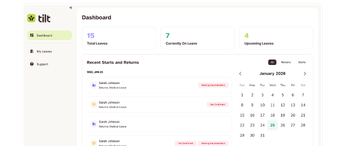
Tilt’s Leave Experience Management platform helps HR teams organize and track leave, maintain visibility into important dates and tasks, and create a clearer experience for employees throughout the leave process.
And because every organization has different needs, you can choose the approach that works for your team. Manage leave internally with Tilt’s software, or add Premium Support for dedicated Leave Specialist support, particularly for employee questions and more complex leave situations.
The goal isn’t to replace every spreadsheet in your organization with a specialized tool. It’s to identify where dedicated technology can meaningfully reduce manual work, improve visibility, and help your team manage leave more effectively.
When you spend less time maintaining trackers and coordinating information across systems, you have more time to focus on the people behind every leave.
A Better Way to Manage Leave Starts Here
Spreadsheets can be a useful starting point, but they don’t have to be the long-term solution for managing leave.
If your current process is taking too much time, becoming harder to maintain, or limiting your ability to support employees effectively, it may be time to explore another approach.
Tilt’s Leave Experience Management platform helps small and mid-sized HR teams bring more structure to leave management without relying on manual coordination for every step. With flexible options for managing leave internally or adding dedicated support to guide your employees through the process, Tilt helps you build a process that fits your organization’s needs.
Because the goal isn’t simply to get rid of spreadsheets. It’s to simplify leave management, give HR greater clarity and control, and make more room for the people who matter most.
Ready to explore a better way to manage leave?
Take a tour of the Tilt platform or connect with our team to see how Tilt could work for your organization.